
When shopping for new Bluetooth headphones or wireless speakers, you have likely encountered long lists of technical specifications. Among these, Bluetooth audio codecs are often the most misunderstood. These small pieces of software act as the translators between your playback device and your wireless audio gear, fundamentally shaping the quality and stability of your Bluetooth listening experience.
For the average consumer, navigating the alphabet soup of SBC, AAC, aptX, and LDAC can feel overwhelming. However, understanding how these Bluetooth codecs function is essential for making an informed purchase that matches your specific hardware. As a senior content writer and editor at TechBuyGuide, I have compiled this guide to help you demystify these technologies. By the end of this article, you will understand why codecs matter, which ones serve your needs best, and how to avoid common pitfalls when upgrading your audio setup.
Quick Answer: What You Need to Know Today about a Bluetooth audio codec
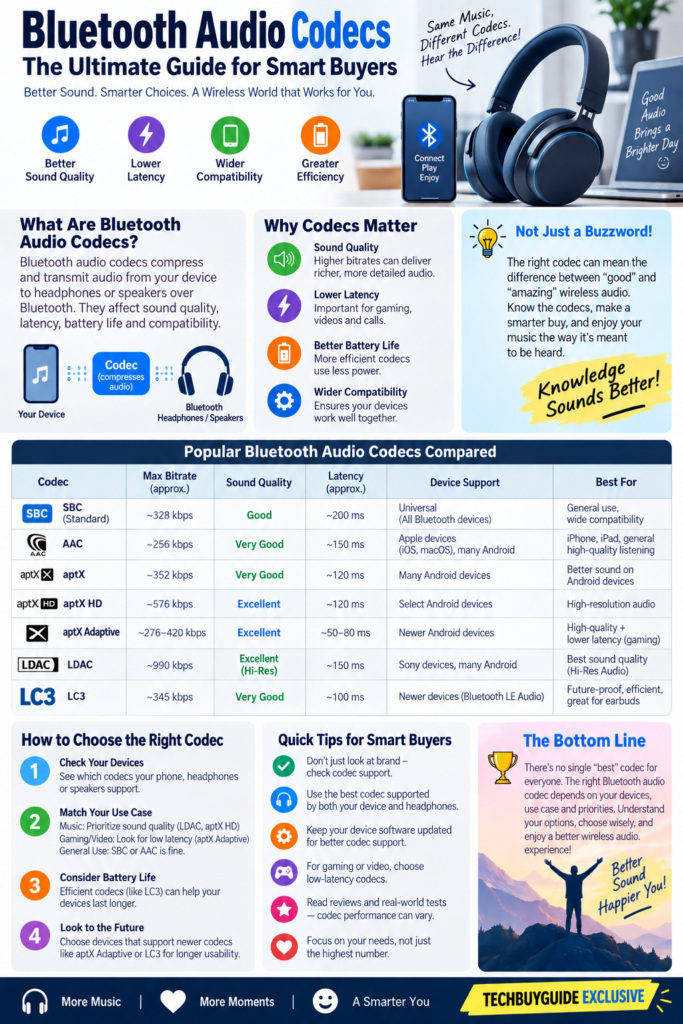
A Bluetooth audio codec is a compression algorithm that shrinks audio files so they can be transmitted wirelessly without significant lag or data loss. If your source device (like a smartphone) and your playback device (like headphones) do not support the same high-quality codec, they will default to a basic standard, which may limit sound fidelity. For most users, AAC provides a reliable experience on Apple devices, while Android users often benefit from aptX or LDAC for higher resolution. Compatibility is the most important factor; always check that your phone and headphones share at least one common high-performance codec.
At-a-Glance Summary of Common Bluetooth audio codecCodecs
| Codec | Best For | Platform Compatibility | Sound Quality |
|---|---|---|---|
| SBC | Universal compatibility | Everything | Basic |
| AAC | Apple ecosystem | iOS, Android | Good |
| aptX | Android stability | Android, Windows | Very Good |
| LDAC | High-resolution audio | Android, Sony gear | Excellent |
What Is a Bluetooth Audio Codec?
At its core, a codec is a combination of the words “coder” and “decoder.” Because raw audio files are too large to stream over a Bluetooth connection in real-time, they must be compressed. The codec takes the audio data, compresses it for transmission, and then the receiving device decompresses it back into sound.
The efficiency and quality of this process vary significantly between different codecs. Some prioritize low latency, which is crucial for gaming or watching videos, while others prioritize bit depth and sample rate to preserve the nuances of high-fidelity music. As a senior content writer and editor at TechBuyGuide, I emphasize that the codec is only one part of the signal chain; the quality of your source file and the internal digital-to-analog converter (DAC) in your headphones also play vital roles.
Read more about Bluetooth Codec
How Do Codecs Affect Sound Quality?
Sound quality is largely determined by the bitrate-the amount of data processed per second-and the efficiency of the compression algorithm. A low-bitrate codec like the older versions of SBC might discard subtle details in high frequencies or cause audible artifacts, which sound like slight distortion or “swishing” in the background of music.
Higher-end codecs like LDAC or aptX Adaptive allow for significantly higher data throughput. This enables the transmission of high-resolution audio files with less lossy compression. However, keep in mind that the improvement is often subtle. If you are streaming audio from a compressed source like a standard Spotify account, the limitations of the streaming service itself may be more noticeable than the limitations of the codec.
Comparing the Most Popular Codecs
SBC (Subband Coding)
SBC is the mandatory baseline codec for all Bluetooth audio devices. It is designed for maximum compatibility rather than high-fidelity performance. While modern implementations of SBC have improved, it is generally considered the “lowest common denominator.” It is perfectly adequate for podcasts and casual listening, but it is not the ideal choice for critical music listening.
AAC (Advanced Audio Coding)
AAC is the standard for Apple devices, and it is also widely supported on Android. It offers a better balance of efficiency and sound quality compared to SBC. When used with an iPhone or iPad, AAC is highly optimized and provides a consistent, high-quality experience. On Android, performance can vary depending on how the manufacturer has implemented the codec.
aptX, aptX HD, and aptX Adaptive
Developed by Qualcomm, the aptX family is a staple in the Android world. Standard aptX provides a stable, low-latency connection that is superior to SBC. aptX HD is designed for higher-resolution audio transmission, while aptX Adaptive dynamically adjusts the bitrate based on signal strength, offering a balance between connection stability and audio quality.
LDAC
Developed by Sony, LDAC is capable of transmitting significantly more data than its competitors. It is widely regarded as the go-to codec for “Hi-Res” wireless audio. Because it requires high bandwidth, it can sometimes be prone to connection drops in environments with heavy wireless interference. It is primarily found on Android devices and Sony audio products.
Real-World Performance and Latency
One of the most common complaints regarding Bluetooth audio is latency-the delay between an action on your screen and the sound reaching your ears. This is particularly noticeable in gaming or video editing. Standard codecs can sometimes introduce a delay of 200 milliseconds or more, which is enough to make dialogue look out of sync.
Try these earbuds for an ultimate gaming performance
Codecs like aptX Low Latency or aptX Adaptive are specifically engineered to minimize this gap. If you are a mobile gamer, checking for these specific codec support features is far more important than hunting for the highest possible bitrate for music.
What Actually Matters for the Consumer?
When shopping, do not get caught up in marketing numbers. A codec is not a magic switch that guarantees “audiophile” sound. The physical design of the headphone drivers, the acoustic tuning, and the quality of the Bluetooth antenna implementation are often more impactful than the specific codec listed on the box.Chk the Codec Tool
As a senior content writer and editor at TechBuyGuide, I often remind readers that compatibility is king. If you use an iPhone, you should prioritize headphones that support AAC. If you use a flagship Android phone, look for support for aptX Adaptive or LDAC to get the most out of your hardware. If you buy headphones that support a codec your phone cannot use, the devices will simply fall back to the basic SBC standard.
Common Buying Mistakes to Avoid
The most frequent mistake is assuming that a “high-res” codec will fix low-quality audio files. If you are listening to low-bitrate MP3s, a fancy codec like LDAC will not make them sound like studio-grade master recordings. Another mistake is ignoring the importance of the source material; if your streaming service is set to “low” or “normal” quality, the codec will have very little high-quality data to work with in the first place.
Additionally, do not prioritize a codec over comfort or battery life. Many consumers sacrifice a comfortable fit or long-lasting battery just to get a specific codec they might not even be able to distinguish in a blind listening test. Always evaluate the product as a whole package.
Frequently Asked Questions
Does my choice of codec affect battery life?
Yes, to a minor extent. Codecs that process more data, like LDAC at its highest setting, require more power from the Bluetooth chip. However, this is usually overshadowed by other factors like volume levels and ANC usage.
Can I upgrade my headphones to support a new codec?
Generally, no. Bluetooth codecs are tied to the hardware chipset inside the headphones. If your headphones do not support a specific codec out of the box, they will not gain that functionality through software updates.
Is LDAC always better than AAC?
On paper, LDAC has a higher potential bitrate. However, if you are using an iPhone, AAC is the native codec and will be more efficient and stable. LDAC is only “better” if your source device supports it and your environment allows for a stable connection.
Do I need an expensive DAC if I use Bluetooth?
No. Bluetooth headphones have their own built-in DAC. When you use Bluetooth, you are bypassing the DAC in your phone and using the one inside your headphones.
How do I know which codec is currently active?
On Android, you can usually see the active codec in the Bluetooth settings menu for your connected device. On iOS, the system handles codecs automatically, and there is no native menu to display the active codec.
Will a better codec stop my audio from cutting out?
Not necessarily. Connection stability depends more on the Bluetooth version (e.g., Bluetooth 5.2 vs 5.3) and the antenna design of your headphones than on the codec itself.
Final Verdict
Bluetooth audio codecs are a vital piece of the wireless puzzle, but they are not the only factor defining your listening experience. For most users, the “best” codec is the one that your phone and headphones share to ensure a stable, high-quality connection. Apple users are well-served by AAC, while Android users have a wider array of options including aptX and LDAC.
Before purchasing, check the technical specifications of both your smartphone and your desired headphones. If they share a high-performance codec, you are on the right track. Remember to prioritize the build, comfort, and intended use of the product over the marketing hype surrounding specific codec names. A well-tuned set of headphones using a standard codec will almost always sound better than a poorly designed set using a high-resolution one.
A good example in this price range is the Anker Soundcore Liberty 4 NC, which supports LDAC, AAC, and SBC, giving Android users access to higher-quality Bluetooth audio while remaining compatible with iPhones through AAC.
Check the current price on Amazon (Anker Soundcore Liberty 4 NC)
Methodology Note
This guide is based on established audio engineering principles, manufacturer technical documentation, independent technology research, and publicly available information regarding Bluetooth standards and compression algorithms. No firsthand laboratory testing was conducted for this article.
In This Article Consumer Problem And Solution Is Presented as .
The common-man problem
The article identifies that ordinary buyers are confused by:
- SBC, AAC, aptX, LDAC and other technical terms.
- Whether a codec actually improves sound.
- Compatibility between their phone and headphones.
- Audio delay while gaming/watching videos.
- Whether paying more for a high-resolution codec is worthwhile.
- Whether a codec matters more than comfort, battery life, and headphone quality.
The solution it provides
actionable answers:
Don’t buy based on codec numbers alone; consider comfort, battery, drivers and overall product quality
iPhone users → prioritize AAC.
Android users → consider aptX/LDAC depending on device support.
Gaming → look for low-latency codec support.
Before buying → check that both phone and headphones support the same codec.
Buying Bluetooth headphones shouldn’t require an engineering degree. If you’ve ever wondered whether you need AAC, aptX, LDAC or just SBC, this guide will help you understand what these codecs actually do, whether you’ll hear a difference, and which one you should look for when buying your next pair.
Editor’s Note
Prices, availability, specifications, and features can change. Always check the manufacturer’s or retailer’s current listing before purchasing.